
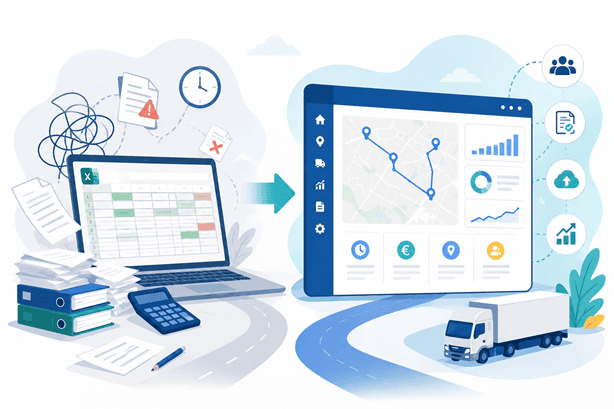
Excel is still the planning tool used by many transport companies. Not because it is the best option, but because for years it has been enough.
That is why the choice between TMS or Excel is not about which tool is more advanced, but about the stage your operation has reached. The question that really matters is not whether Excel works. It is how long it will continue to work.
As operations grow, spreadsheets begin to show limitations that are not always obvious until they lead to an error, a delay or an issue with a customer.
This comparison is aimed at logistics directors and operations managers who need to decide, based on facts rather than sales pitches, whether Excel is still the right tool for their current volume.
Before getting into the comparison, it is worth understanding what a TMS actually includes, so that each point can be assessed against a clear reference.
Why Excel is still the starting point
Excel remains widely used for good reason. It offers real advantages, particularly for smaller operations or businesses in their early stages:
- It requires no implementation or additional learning curve.
- It offers complete flexibility to adapt templates to specific needs.
- For many companies, it involves no additional licence costs.
- It provides a sense of complete control because every cell is managed manually.
The problem is not the tool itself. It is what happens when the volume of orders, vehicles and customers grows beyond what a spreadsheet can reliably handle.
Where Excel is no longer enough
Real-Time Visibility
A spreadsheet reflects the situation at the moment someone updates it, not at the moment a change actually occurs. When that gap is multiplied across dozens of daily routes, decisions end up being made based on outdated information.
Dependence on manual updates
Every route change, incident and load confirmation has to be entered manually. The more people involved in the process, the greater the risk that an update will be missed or duplicated.
Limited traceability
Answering questions such as who modified a route, when a delay was communicated or which version of the file is the final one becomes increasingly difficult as more people work on the same document.
Lack of automation
Excel does not automatically calculate variable rates, generate transport documentation or flag capacity and availability conflicts. Each of these tasks depends on someone handling it manually.
Scalability
What works for 20 routes a day does not work in the same way for 200. The file grows, becomes slower and is increasingly vulnerable to human error.
These five limitations are what really tip the balance between TMS or Excel. It is not a matter of preference, but of identifying the point at which each tool starts saving—or costing—the team time.
TMS or Excel: a practical criterion-by-criterion comparison
Criterion | Excel | TMS |
Operational visibility | Depends on manual updates | Real-time visibility shared across roles |
Rate calculation | Manual and prone to errors | Automatic, by customer and supplier |
Traceability | Limited and difficult to audit | Recorded for each operation |
Multi-user collaboration | Risk of different file versions | A single shared environment |
Scalability | Performance declines as volume grows | Designed to scale |
Integrations with other systems | Virtually non-existent | Via API with other tools |
Signs that it is time to choose between TMS or Excel
- Several people edit the same file simultaneously and different versions start to appear.
- Incidents are communicated through separate channels, making it difficult to reconstruct what happened.
- The time spent updating and reviewing Excel grows faster than the volume of business itself.
- Rate or capacity errors are only detected when invoicing or delivery takes place.
- Reliable KPIs cannot be obtained without spending hours manually consolidating data.
None of these signs appears overnight. They build up gradually until managing the file takes more time than managing the transport operation itself.
Detto questo, il passaggio a un nuovo sistema non è privo di rischi se viene affrontato senza un’adeguata pianificazione. Prima di procedere, è utile conoscere
What your team gains by moving from Excel to a TMS
- Real-time planning, with shared visibility across traffic teams, customers and carriers.
- Automatic rate calculation and validation before invoicing.
- Complete traceability for every operation, without relying on one person's memory.
- Less dependence on a single file or a single person to keep information up to date.
- The ability to scale without the tool itself becoming a bottleneck.
Conclusion
Excel is not a management mistake. It is a stage. The problem arises when that stage lasts longer than the operation can afford, and the costs of maintaining it only become visible once they have already affected a customer or an invoice.
The decision between TMS or Excel does not depend on the size of the company, but on whether the current tool is still providing control or, on the contrary, has started taking it away.

Communications & Marketing Responsible at Hedyla
Multimedia Technical Engineer. Working 11 years in the Audiovisual and Communication Department of a multinational company. Responsible for the Marketing and Communication Department in several companies in the technology sector.
Designing digital strategies. Innovating and adding value to communication.
La dependencia de la actualización manual es una señal muy útil para decidir el cambio. Una hoja puede mostrar un vehículo libre cuando ya se le ha asignado otra recogida. Antes de implantar un TMS conviene definir quién actualiza cada estado y qué datos son obligatorios; si no, la herramienta nueva heredará las mismas incoherencias.
¡Excelente reflexión! La dependencia manual y el desfase de datos en tiempo real son, de hecho, los principales detonantes para buscar un TMS. Sin embargo, como bien señalas, sin procesos definidos y responsabilidades claras, la nueva herramienta corre el riesgo de reproducir los mismos errores de la hoja de cálculo. ¡Gracias por enriquecer el artículo!